
In brief: A smart home system connects lighting, heating, security and garden irrigation through a shared network. First, plan your goals, rooms, power supply and wireless coverage, choose an open standard, and secure your router and devices. This lets your home automation system grow step by step, stay easy to use and work reliably even if an individual device fails.
A smart home system connects lighting, heating, security and garden irrigation through a shared network. First, plan your goals, rooms, power supply and wireless coverage, choose an open standard, and secure your router and devices. This lets your home automation system grow step by step, stay easy to use and work reliably even if an individual device fails.
Many households start with a smart light bulb or a connected thermostat. The difference between individual gadgets and a well-planned smart home system becomes clear when multiple devices need to work together. Good planning helps prevent incompatible devices, wireless dead zones and unnecessary cloud subscriptions.
This guide explains how to plan home automation for a detached house. You will define your goals, check the technical basics, choose components and plan security measures for indoor spaces, heating and the garden.
How does a smart home system work?
A smart home system collects information, processes rules and controls devices. A temperature sensor measures the room temperature, the central control unit compares it with your target setting, and a heating actuator adjusts the heat. For lighting, a motion sensor can only replace a manual switch effectively if you also account for brightness, time of day and the purpose of the room.
Home automation works across four levels. Sensors provide data, the control system makes decisions, actuators carry out commands, and control devices let you access the system. If one level is missing, the function is often limited to a simple remote control.
What tasks does a smart home system handle?
- Sensors: Door contacts, motion sensors, temperature sensors, humidity sensors and smoke alarms detect conditions.
- Central control: A bridge, gateway or server processes rules and connects different devices.
- Actuators: Relays, radiator thermostats, shutter motors, lights and valves carry out commands.
- Control: Buttons, an app, voice control, a display or automation let you access the functions.
Plan every automation with a clear trigger and response. The rule “motion detected = lights on” is not enough. Add the room, brightness, time and switch-off behavior so the light does not turn on at full power in the middle of the night.
Many systems split processing between a local control unit and the cloud. Local control keeps working even when the internet connection is interrupted. The cloud makes remote access, voice recognition and synchronization easier, but it ties you to the provider and its business model.
Pro tip
Write a short if-then rule for every function you plan. Example: If the humidity in the bathroom rises above 70 percent after a shower, the ventilation switches on for 20 minutes. This wording immediately shows which sensors, actuators and timing conditions you need.
Why should you plan home automation before buying?
Home automation starts with everyday life, not the product packaging. For a week, pay attention to which switches, radiators, doors and garden areas you use often. Note recurring routines and situations that affect comfort, security or energy use.
Then set three priorities. Typical goals include reducing heating costs, automating lighting, preventing water damage, improving access control or watering the garden based on need. A system with a few clear tasks stays easy to understand and can be expanded later.
Which questions should you answer before choosing a system?
- Which devices should respond automatically?
- Which functions must work without an internet connection?
- Which rooms are outside your Wi-Fi coverage?
- Which cables, switches and outlets are already in place?
- Which data may leave your home?
- How will you operate the system if your smartphone or voice assistant stops working?
Create a floor plan and mark power connections, windows, doors, radiators, the router and possible installation points. In the garden, also consider distance, line of sight, moisture and access to an outlet. Outdoor areas need durable devices and a wireless plan that accounts for walls and terrain.
Why is the wireless standard so important?
Wi-Fi offers high data rates and is available in many homes. Battery-powered sensors, however, usually need less data and benefit from energy-efficient wireless protocols such as Zigbee, Z-Wave or Thread. For each device, check whether it communicates directly with your central control unit or needs an additional bridge.
Look for open interfaces, documented updates and active manufacturer support. A low purchase price loses its appeal if an app is discontinued or a gateway stops receiving updates after only a few years.
“No universal default passwords.”
The standard is aimed at manufacturers, but it also gives you a clear buying rule: avoid devices with unchangeable or identical access details. Change any preset password right away and favor products with their own user management.
Which components do you need for smart home technology?
A smart home system is more than just an app. You need a reliable connection, suitable controls and devices that carry out commands safely. Start with the infrastructure, then choose the features you want to use.
These components should be part of your plan
- Central hub or gateway: It connects wireless devices, manages rules and provides the user interface.
- Network: Routers, access points and, where necessary, a separate IoT network help ensure reliable communication.
- Sensors: They measure motion, temperature, humidity, brightness, water or the status of doors and windows.
- Actuators: They switch electrical circuits, regulate radiators, move blinds or open irrigation valves.
- Controls: Push buttons and displays remain usable even when your smartphone is unavailable.
- Power supply: Batteries, power supplies and backup power solutions affect the reliability of every function.
When building a new home, plan network cables, deep device boxes and central areas for your smart home equipment early. When retrofitting, work with existing switches, wireless actuators and battery-powered sensors. Leave work on mains voltage to a qualified electrician.
How do you integrate lighting effectively?
Start with rooms where you frequently switch lights or need different scenes. Hallways, stairwells, entrances and outdoor lighting are well suited to motion- and time-based rules. In living areas, combine presence detection, brightness sensors and manual switches so the automation fits your habits.
The smart Christmas tree lights with 560 LEDs from the range
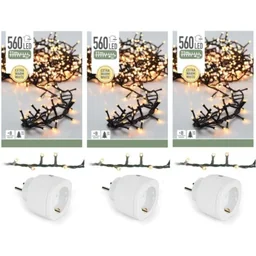
The
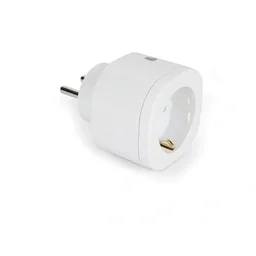
Important note
Only connect smart home devices to a hub if the wireless standard, app and security features are compatible. A device with the word Smart in its product name does not automatically work with every system. Check the manufacturer's specifications, permissions, update support period and return options before buying.
Outdoor areas need separate consideration. In the Garden + Outdoor range, you will find the essentials for many projects, while sensors and actuators provide automatic control. Plan cable routes, outlets and protection from splashing water alongside wireless coverage.
How do you plan smart home features room by room?
A room-by-room plan helps prevent features from overlapping. For each room, write down what you want to measure, switch on and off, and control manually. Then consider whether automation offers a real benefit or simply adds another app.
Entrance, hallway and stairs
At the entrance, connect a door contact sensor, outdoor light and, where applicable, a camera. A motion sensor switches on the hallway lights when brightness falls below a set level. At night, dim the lights so the automation does not cause glare.
- A door contact sensor detects when an entrance is opened.
- A motion sensor controls the guide light.
- A brightness sensor prevents the light from switching on during the day.
- A manual button disables or overrides the rule.
For cameras and video doorbells, check the viewing angle, storage location and access permissions. A security feature should not depend on a single cloud service or smartphone.
Living room and kitchen
In the living room, scenes work better than lots of individual switches. A TV scene dims the lights, a guest scene turns on several lights, and an away rule deactivates unnecessary devices. Keep a physical wall button so guests and children can also control the lighting.
In the kitchen, combine task lighting, ambient lighting and presence detection. Motion sensors should not be positioned directly above the cooker or behind tall cabinets, because heat, steam and obstructed views can affect their readings.
Heating and energy
Heating automation starts with schedules and room temperatures. Window contacts reduce heating when a window is open, while presence rules activate the comfort temperature only when needed. Avoid creating too many rules, or you may spend a long time tracking down the cause of every change.
Record electricity and heat consumption regularly. The data can help you identify standby consumption, long operating times and unusual loads. A smart plug is not a substitute for a professional inspection of a high-power appliance.
Garden and outdoor areas
In the garden, home automation combines weather data, soil moisture, valves and schedules. Use existing zones from the garden irrigation as the basis for your plan. Divide lawns, flower beds and planters into separate zones if they need different amounts of water.
For larger areas, suitable irrigation equipment is part of the hydraulic plan. Automation then controls the valves and watering times, but it does not replace an adequate water supply, filtration or pressure testing. Add a rain sensor or use local weather data so the system does not keep watering when the soil is already wet.
An automatic watering system also needs a clear emergency state. In the event of a leak, frost or an empty water reservoir, the system must shut off and notify you.
How do you operate the system in everyday life?
Plan at least two ways to control important functions. A wall button switches the lights, the app shows statuses, and automation handles recurring routines. Voice control can complement these methods, but should not replace them for security-sensitive or private functions.
is an example of a wearable control concept. Whether a Smart-Watch actually communicates with your home automation system depends on the app, operating system and hub. Check compatibility before making a watch a permanent part of your control setup.
How do you secure your smart home and home network?
Every connected device expands your home's attack surface. Secure the router first, followed by the individual devices. Create unique login details for smart home components and never reuse passwords.
These security measures are essential basics
- Update your router, hub, apps and devices regularly.
- Enable multi-factor authentication if the provider supports it.
- Separate IoT devices from your private computer network by placing them on their own network.
- Disable features you do not need, such as remote access or open port forwarding.
- Check app permissions for location, microphone, contacts and camera access.
- Replace devices for which the manufacturer no longer provides security updates.
Privacy starts with the amount of data collected. A motion sensor does not need audio recording, and an automatic garden watering system does not need access to your contacts. Choose local processing when it is sufficient for the desired function.
“Data protection by design and by default.”
This principle applies directly to planning: enable privacy-friendly settings during setup. Store only the data you need for convenience, security or analysis, and delete old recordings after a fixed period.
What happens if the power or internet fails?
Test critical functions with the internet connection deliberately interrupted. Lights, heating, door contacts and water shut-off valves should continue to work in a sensible basic mode. For door locks, garage doors and heating systems, you also need mechanical or local emergency controls.
Document your hub, passwords, wireless devices and fuses. Do not keep the instructions exclusively in the cloud. A short device list makes repairs, replacement and expansion easier.
What costs and limitations should you plan for?
Costs depend more on the wiring and range of functions than on the platform name. Individual lights and sensors are an inexpensive starting point. A complete retrofit with heating controls, roller shutters, security, networking and garden valves requires significantly more devices, installation time and planning.
How do you build a smart home in stages?
- Starting phase: Install the hub, a router extension and a few sensors. Begin with lighting, a heating schedule or a clearly defined security area.
- Comfort phase: Add push buttons, radiator thermostats, roller shutter controls and scenes. After each expansion, check the range, response time and ease of use.
- Energy phase: Monitor consumption, optimize heating times and control selected appliances as needed.
- Outdoor phase: Plan sensors, valves and cables for garden areas. Coordinate the automation with water availability, weather and frost protection.
Reserve part of your budget for networking equipment, batteries, replacement parts and professional electrical work. Expect ongoing fees for cloud services. Compare the total cost over several years, not just the purchase price.
Which limitations should you accept?
- Wireless connections can become weaker through reinforced concrete, metal surfaces and long distances.
- Battery-powered sensors require maintenance and do not always report a low charge in time.
- Cloud services can fail, change their prices or be discontinued.
- Automatic rules only work as well as their sensors and measurements.
- A complex system needs documentation, updates and occasional checks.
Additional advice
Test every new automation first with a harmless function, such as a floor lamp. Monitor the rule for several days before integrating heaters, doors, pumps or irrigation valves. This helps you identify false alarms and incorrect timing conditions without risking damage.
A good smart home remains understandable if the app fails or a device needs to be replaced. That is why you should plan with open standards, local control, clear rules and a manual alternative. This allows home automation to develop from individual convenience functions into reliable intelligent home technology.
Frequently asked questions
- How do I start planning a smart home system?
- Start with three to five specific goals, such as reducing heating costs, switching lights automatically or controlling water in the garden. Then check your network, power supply and compatibility. Only after that should you choose the hub, wireless standard and devices. A small, well-planned start helps prevent expensive mistakes.
- Which smart home wireless standard is suitable for a single-family home?
- No single standard is universally suitable for every single-family home. Wi-Fi works well for devices that require high data rates and have access to good network coverage, while Zigbee, Z-Wave and Thread often connect energy-efficient sensors. Key factors include range, encryption, local control, manufacturer support and the ability to replace devices later.
- Can I run a smart home without the cloud?
- Yes, provided the hub and devices support local control. Before buying, check which functions work without an internet connection: switching, sensor alerts, schedules and heating rules should be available locally. Cloud services can add remote access, voice control or updates, but they should not be the only way to operate the system.
- How secure is a smart home?
- Security depends on device quality, updates and your network configuration. Change default passwords, enable multifactor authentication, separate IoT devices from your private computer network and install firmware updates. Buy products with a clear update commitment. Critical functions such as door locks also require a manual emergency override.
- How much does home automation cost for a single-family home?
- Costs range from a small three-figure amount for individual lights and sensors to several thousand dollars for a comprehensive retrofit. The key factors are wiring, the hub, the number of rooms and the functions you want. Also budget for installation, network components, replacement devices and possible subscriptions for cloud services.
You may also be interested in
- Smart Home Security: How to Protect Your Home
- Voice Assistants in the Smart Home: How to Control Your Home with Your Voice
- Understanding Smart Homes: The Guide to a Connected Home
- Smart Home Systems: Benefits for Your Home and Garden
- Save Energy Smartly: Tips for Your Home
- Smart Home Heating & Lighting: Efficient & Convenient