
In brief: Smart home lighting connects lamps, sensors and switches to an app or voice control. You can set scenes, schedules and motion rules, and adjust brightness and colour temperature automatically. For home lighting control, compatible standards, secure networks, suitable sensor positioning and operation that also works without a smartphone are essential.
Smart home lighting puts light where you need it and switches it off when a room is empty. Sensors, schedules and scenes take care of recurring tasks. This allows you to combine convenience, security and a well-planned lighting scheme for flats, houses and outdoor areas.
Good home lighting control does not start with as many features as possible. It starts with the question of which light serves which purpose. Ambient lighting, task lighting, orientation lighting and decorative accents need different brightness levels and triggers.
How does smart home lighting work?
With a conventional lamp, you interrupt the electrical circuit using a switch. A smart light also receives control commands via Wi-Fi, Zigbee, Thread or another wireless standard. An app, voice assistant, sensor or automatic schedule triggers the command.
Control can happen directly or through a hub. A Wi-Fi lamp usually connects directly to the router. Zigbee and many Thread devices use a mesh network and often require a bridge or suitable controller. Matter standardises control of compatible devices, but does not automatically replace the wireless connection.
Which components are involved?
You build a system from several components. Not every component is needed in every room. To get started, two smart bulbs and a physical switch are often enough.
- Smart LED bulbs: They dim the light, change the colour temperature on suitable models and save scenes.
- Smart wall switches: They retain push-button control and prevent the power supply from being permanently interrupted at the switch.
- Motion and light sensors: They detect presence, daylight and sometimes open doors or windows.
- Bridge or controller: The hub connects devices, processes rules and provides shared scenes.
- App or voice control: This is used to set up, check and manually trigger lighting functions.
Which wireless technology is right for your home?
Wi-Fi is suitable for individual lights and small systems, but with many devices it places more strain on your home network. Zigbee is energy-efficient and stable when several devices act as routers in the mesh. Thread also uses a mesh network and suits modern Matter installations.
First decide where the hub should be located and how many devices you may add later. Also check whether the lamps can still be controlled locally if the internet goes down. A standard wall switch or a button on the device prevents the lighting from becoming unusable if the app malfunctions.
Pro tip
Start with a room you use every day. Set up an ambient lighting scene, a task lighting scene and an automatic evening routine there. After two weeks, you will see which functions genuinely help in everyday life. Only transfer proven rules to other rooms.
Why is intelligent lighting control worthwhile?
Intelligent lighting does more than change brightness. It creates consistent routines. In the morning, a scene switches on bright, fairly neutral light in the bathroom and kitchen. In the evening, a warm scene reduces brightness in the living area and keeps the hallway and stairs safely lit.
In a flat, easy retrofitting is especially important. You do not need to install new wiring if you use suitable bulbs or clip-on switches. In a house, it is also worth planning separate zones for the entrance, basement, garage, stairs and garden.
What can you automate with smart lighting?
- Time: A morning routine starts at a set time on weekdays. At the weekend, it shifts automatically.
- Motion: Hallways, basements or utility rooms are lit only while they are being used and switch off after a short delay.
- Brightness: An outdoor light responds only when the surroundings are dark enough. It stays off in daylight.
- Door and window contacts: Opening the front door starts an orientation scene. When you leave, a central command switches off all selected lights.
- Presence: A scene simulates changing light sources while you are away. It should not follow a rigid pattern that is identical every evening.
For automation in a flat, it is best to combine a trigger with a condition. A motion sensor alone may detect every pet or movement in the hallway at night. The rule if motion is detected and brightness is below 30 lux and the time is between 22:00 and 6:00 delivers much better results.
Operation also remains flexible. You can start a scene using the switch, adjust it in the app or trigger it with a voice command. Voice input is useful when your hands are full, but it does not replace a reliable button on the wall.
Which solution is right for an apartment, house and garden?
The right solution depends on the size of your home, the number of lights and the available installation options. In a rented apartment, avoid making changes to the electrical installation and opt for smart bulbs, plug-in adapters and battery-powered sensors. In your own home, you can plan for flush-mounted switches, presence sensors and permanently installed outdoor lights.
How do you control the lighting in an apartment?
Living rooms and bedrooms benefit from several lighting zones. A ceiling light provides the general lighting. A floor or table lamp creates focused light for reading. Indirect LED strips add accents behind furniture or on shelves.
Assign each light to a room and give it a clear name. Terms such as Living room ceiling, Sofa lamp and Dining table pendant work better than unclear names such as Lamp 1 or Device 4. This keeps scenes and voice commands easy to understand.
What does a house with an outdoor area need?
In the house, connect the lighting control system to transition areas: the front door, hallway, stairs, garage and patio. Outdoor lights respond to dusk and movement. Set the switch-off delay so you can leave the area safely without leaving the light on all night.
- Entrance: Dim general lighting runs in the evening, while a movement trigger increases the brightness when someone approaches.
- Garden path: Small orientation lights mark steps and changes of direction. Position them to shine downwards without glare.
- Patio: A warm scene supports conversation. Motion automation is suitable here only for the access route, not the entire seating area.
- Garage and basement: Presence sensors save you from having to find switches and prevent lights from being left on.
For lights, accessories and seasonal decorations, you will find suitable additions in the Garden and Outdoor section. For outdoor products, always check the protection rating, connection, installation location and the manufacturer's specifications. Smart control does not replace a safe electrical installation.
Which products complement your lighting plan?
refers to 11-metre Christmas tree lights with 560 LEDs that can be controlled by phone for indoor use. They are suitable for seasonal scenes on the tree, in the window or on a shelf. Create a separate group for them so that the decoration does not start accidentally with your everyday evening lighting.
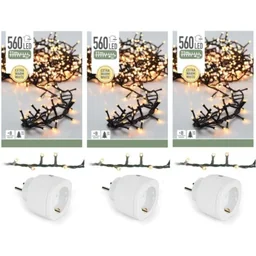
is another version of the smart-controlled Christmas tree lights, measuring 11 metres in length and featuring 560 LEDs. This version is suitable for a larger decorating area or several rooms. Set a clear time limit and switch the decoration off completely at night.
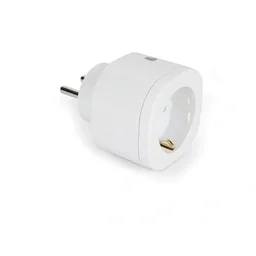
is a 2.4-metre-high inflatable snowman with rotating lights. The Christmas decoration complements a seasonal outdoor or entrance display, but it is not a central smart light. Use it only in a location where the protection rating, power supply and manufacturer's specifications are suitable for the intended use.

If you want to compare seasonal lighting options in detail, take a look at the Clearance section. For general product selection, visit the Westfalia shop.
How do you plan your home's lighting control?
Make a room list before you buy. Note the existing lights, switches, sockets, windows, doors and walking routes. Mark places where you often forget to switch off the lights and areas where motion detection could be useful.
Next, plan the different control levels. Automation handles recurring tasks. A switch starts the most important scenes. The app takes care of setup and fine-tuning. This combination remains useful even if a sensor is triggered incorrectly or your smartphone is not to hand.
How do you divide rooms into lighting zones?
- General lighting: It provides even brightness throughout the room. Choose a scene that does not cause glare and offers enough extra brightness for cleaning.
- Task lighting: Kitchens, desks and workbenches need focused, bright light. A separate switch or scene prevents the entire room from being lit at maximum brightness.
- Accent lighting: Shelves, pictures and plants receive lower brightness. Use coloured effects sparingly so the room does not feel unsettled.
- Orientation lighting: Stairs, hallways and paths receive dimmed lighting at night. Sensors activate it only when needed.
Which brightness and colour temperature are suitable?
Lumens describe the amount of light. Kelvin describes the colour temperature. Warm white light at around 2,700 to 3,000 Kelvin creates a calm atmosphere in living areas. Neutral white light at around 4,000 Kelvin supports concentrated work. These values are a guide, not a fixed rule for every room.
Pay attention to good colour rendering, especially in the kitchen, bathroom and dressing room. A high CRI value helps you see colours more naturally. For most living spaces, a dimmable white light is sufficient. RGB lights offer additional colours, but they increase complexity and are not automatically suitable for every task.
Also check the installation and beam angle. A very bright light can cause uncomfortable glare if it is installed directly at eye level. Several weaker light sources often create a more pleasant room atmosphere than a single central light.
Additional advice
Save scenes according to their function, not the colour used. Names such as Reading, Cooking, Watching TV and Night remain easy to understand if you replace the bulbs later. This means you do not have to recreate automations simply because a lamp uses a different colour temperature.
How do you set up automations and scenes?
Start with just a few rules. Every routine should have a clear trigger, a recognisable action and a sensible end condition. If a rule requires several exceptions, split it into two smaller rules.
Which routines work well in everyday life?
- Morning: Switch on bright, neutral light in the kitchen and bathroom. The scene ends after a set time or when you leave the room.
- Evening: Activate warm, dimmed lighting in the living area. Keep the hallway lights on at a low level so they remain easy to find.
- Night: Motion should trigger only an orientation light. Keep ceiling lights off so no one is dazzled.
- Absence: A central command switches off selected indoor and outdoor lights. For presence simulation, choose changing time windows.
- Cleaning: A temporary scene sets all lights to full brightness and ends automatically after cleaning.
How can you avoid false triggers?
Position motion sensors so that they detect the route people walk along rather than directly facing a window. Depending on the sensor, sunlight, heat sources and passing vehicles can trigger false alerts. Test each automation at different times of day.
Set the sensitivity and delay time to suit the room. In a hallway, 30 to 90 seconds is often enough. In a cellar or on the stairs, you need more time. If you have pets, a sensor with suitable pet filtering can help, but it does not replace checking the situation on site.
Do not link your lighting indiscriminately to every event. During the day, opening a door does not need to automatically switch the entrance area to full brightness. Combining the time, brightness level and door contact produces a more appropriate action.
“Energy efficiency first.”
This principle also applies to lighting design. Start by using efficient LED lights and avoid unnecessary brightness. Automation supports this approach by shortening operating times and adapting scenes to actual usage.
What should you consider regarding security, privacy and electricity consumption?
A smart lamp is a connected device. It communicates with your router, app or hub and may receive software updates. Treat your lighting system like any other device on your home network.
How do you keep lighting control secure?
- Updates: Install firmware and app updates promptly. They fix errors and security vulnerabilities.
- Passwords: Use different, long passwords for your account, bridge and router.
- Network: Where possible, separate IoT devices from your private computer and storage network.
- Permissions: Check which apps are allowed to access your location, microphone, contacts or local network devices.
- Cloud: Enable remote access only when you need it. Local control reduces dependencies.
- Fallback: Plan at least one manual control option for each room.
Important note
Work on 230-volt wiring must be carried out by a qualified electrician. Do not replace flush-mounted switches yourself if you cannot safely assess the installation or the conductors required. For outdoor lighting, moisture protection, cable protection and local installation conditions must also be suitable.
How do you protect your privacy?
You usually do not need continuous location sharing or a microphone for a lighting scene. Disable permissions that are not required for the specific function. If a camera, speaker or presence sensor processes data, check where it is stored, how long it is retained and how it can be deleted.
A local controller can reduce your dependence on a cloud service. Even so, check which data the manufacturer processes and how long support will continue. Do not buy devices based solely on a low price. A predictable update period and clear documentation are part of product quality.
“The controller shall implement appropriate technical and organisational measures which are designed to implement the data protection principles ... effectively.”
What really saves electricity?
LED lights use significantly less energy than many older light sources. Smart control saves additional energy by switching off lights that have been left on, reducing brightness and limiting operation to actual periods of use.
Check the operating times after setup. A ten-minute delay on every sensor can wipe out the benefit. Switch off decorative scenes at night and disable functions that do not provide any everyday benefit. Bridges, sensors and power supplies also consume some standby power.
A good solution remains easy to understand. You know the most important scenes, can operate every light manually and know which devices process data. Smart home lighting then supports your everyday life instead of becoming another task.
Frequently asked questions
- What does smart home lighting include?
- Smart home lighting includes smart LED bulbs, intelligent wall switches, sensors, an app and, depending on the wireless standard, a bridge or Matter controller. These connect individual lights, let you set up rooms and scenes, and control the lighting by schedule, motion, voice command or at the touch of a button.
- Do I need a bridge for smart lights?
- No, a bridge is not always required. Wi-Fi lights connect directly to your router, while Zigbee or some Thread devices generally need a hub. Before buying, check the wireless standard, compatibility with your app and whether the most important functions continue to work locally without the cloud.
- How does automated lighting control work at home?
- Automated lighting control uses triggers such as the time, brightness, motion or door contacts. A sensor reports the event, the hub checks the rule and activates a scene. You can also define conditions, delays and a maximum on-time so that hallway or outdoor lights do not stay on unnecessarily long.
- Does smart home lighting actually save electricity?
- Smart home lighting can save electricity when you combine LED lights with suitable schedules and occupancy rules. The technology does not save energy automatically. Scenes that are too bright, long switch-off delays, numerous standby devices or decorative lighting left on continuously can increase consumption despite intelligent control.
- Is smart lighting control safe?
- Protect your router, bridge and lights with the latest updates, unique passwords and a separate guest or IoT network. Enable two-factor authentication where available and review cloud permissions. Manual control is still useful if the internet, app or voice service stops working.
Ergänzung: Smart Home Beleuchtung: Komfort & Effizienz im Zuhause
Intelligente Beleuchtung erhöht den Wohnkomfort, indem sie sich automatisch an Tageszeit, Anwesenheit und persönliche Routinen anpasst. Sensoren können das Licht beim Betreten eines Raums einschalten, während Zeitpläne morgens für eine sanfte Helligkeit sorgen und abends die Beleuchtung schrittweise reduzieren.
Auch die Energieeffizienz lässt sich verbessern. LED-Leuchten verbrauchen grundsätzlich wenig Strom, während eine bedarfsgerechte Steuerung unnötige Betriebszeiten vermeidet. Besonders effektiv sind Kombinationen aus Bewegungs- und Helligkeitssensoren, die das Licht nur dann aktivieren, wenn es tatsächlich benötigt wird.
- Automatische Abschaltung: Verhindert eingeschaltete Leuchten in ungenutzten Räumen.
- Dimmfunktionen: Senken den Energieverbrauch und schaffen eine passende Lichtstimmung.
- Zentrale Steuerung: Ermöglicht die Kontrolle mehrerer Leuchten per App, Sprache oder Zeitplan.
You may also be interested in
- Smart Home Heating & Lighting: Efficient & Convenient
- Planning Lighting: Bright Ideas for Your Home and Garden
- Installing a Smart Home Light Switch: Guide & Benefits
- Home Lighting Design: Combining Ambience & Function Perfectly
- Smart Home: Efficient Solutions for Your Home
- Setting Up a Smart Home: Your Guide to Greater Comfort & Security