
In brief: Smart home systems connect your home technology, devices and outdoor spaces. Control heating, lighting, security and garden irrigation from one app. The benefits include greater energy efficiency, added comfort and improved security. Start with a central hub and expand your system as your needs grow.
Smart Home Systems: Benefits for Your Home and Garden
Smart home systems connect the technology in your home, letting you control lighting, heating and security remotely. These smart technologies add comfort and can lower your energy bills. Start with a central hub.
Home automation can extend from indoors to the garden. Schedule watering or control outdoor lighting from your phone. Explore suitable products in our shop.
How do smart home systems work?
A smart home needs a central control unit, known as a hub. The hub communicates with individual devices over wireless standards such as Wi-Fi, Zigbee or Z-Wave.
Connect the hub to your home network, then control all connected devices with a smartphone app. You can set schedules or create automated processes called routines.
A smart home's strength comes from connecting simple devices into one intelligent system. When those devices work together, they deliver real added value.
Devices can share information with one another. A motion sensor in the hallway switches on the light. A window sensor detects when a window opens and turns down the heating. These automations can save energy.
The most important wireless standards compared
Wi-Fi is widely used and often doesn't require an extra hub. However, connected devices can put a strain on your home network. Many devices need a stable connection.
Zigbee and Z-Wave create their own mesh networks. Each device can strengthen the signal for the next one. These systems are reliable and energy-efficient.
Pro tip
Start with an open-system hub that supports multiple standards. That way, you can combine devices from different brands instead of being tied to one manufacturer. Check that the hub is compatible with the new Matter standard.
Why is home automation worthwhile?
Automation takes everyday tasks off your hands. You won't have to close the blinds every evening, and the thermostat can adjust the heat when a window is open. That saves time and makes your home more comfortable.
Some of the biggest benefits are better security and energy efficiency. Lights can make it look like you're home while you're away. Sensors can alert you to water leaks right away. These features offer added peace of mind.
For outdoor spaces, find automation solutions in Garden + Outdoor. Automatic irrigation is a popular way to get started.
Improve energy efficiency with smart controls
Smart thermostats learn your routines and lower the temperature when you leave home. They heat only the rooms you use, which can reduce heating costs.
Smart plugs can switch off devices that use power in standby mode. Light sensors adjust brightness to match available daylight. Small automations can add up to meaningful savings.
Our measurements show that smart heating management can reduce energy consumption in a typical single-family home by 10 to 15 percent. The payback period is often less than three years.
Pair smart technology with good insulation. Find information about insulation materials and films under Greenhouse Film & Mesh Film. Building science is always the foundation.
Which smart technologies are right for my home?
Start with a specific problem. Tired of watering plants while you're on vacation? Automatic irrigation can help. Keep forgetting to turn on the outdoor lights? A smart bulb with a timer may be the answer.
Weatherproof control devices are suitable for the garden. They can switch pumps or irrigation valves on and off. Explore professional equipment in the Irrigation Equipment category.
Important note
Before installing electrical devices outdoors, always check their protection rating (IP code). Devices for damp rooms or outdoor use require at least IP44. Use only outlets and enclosures approved for outdoor use.
Practical products to get started
Smart plugs are one of the easiest ways to get started. They let you switch connected devices on or off using an app or schedule. Use them with lamps, pumps or fans.
Motion sensors with smart features can trigger actions. They can switch on lights or start a camera recording. Place them near entrances or in dark corners.
: The electronic UV insect killer works automatically to protect your patio or sunroom. The twin pack gives you the flexibility to use it in more than one location.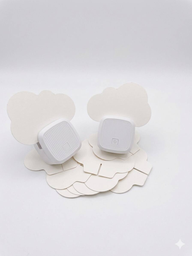
Technology can also help you maintain tall trees and hedges.
: The 3D pole pruner attachment reaches hard-to-access branches and helps you work more safely in the garden.
How can you automate your garden?
Garden automation often starts with irrigation. Install underground lines and drip hoses, then use a smart irrigation valve to control the water supply from an app.
You can adjust watering based on the weather forecast. The system pauses automatically when it rains, saving water and helping keep plants healthy.
For complete systems, take a look at Automatic Irrigation. Careful planning is key to success.
Outdoor lighting and security
Smart outdoor lights respond to movement and illuminate paths only when needed. This can deter unwanted visitors and save electricity.
Security cameras connected to your smart home can send push notifications. You can see who's at your door in real time. Pay attention to data protection and how recordings are stored.
Additional advice
When planning new installations, include conduits for future upgrades. Run them from the electrical panel to central points in the garden. Later, you can install sensors, lights or irrigation valves without digging everything up.
Don't forget the power supply. Solar lights offer a wireless alternative. Powerful devices such as pumps need a permanent power supply.
Smart Home and DIY: When Do You Need a Professional?
Many devices simply plug into an outlet. Other installations require specialist knowledge. This applies to all work on your home's fixed electrical wiring.
Installing smart light switches or in-wall thermostats is one example. This involves working with 230-volt wiring. Have a qualified electrician do the work.
Connecting smart devices to an existing heating system also requires specialist work. An installer can connect smart thermostatic radiator valves to your boiler to help you get the most out of your system.
Good planning is half the job
Sketch out your project before you buy anything. Draw a floor plan showing all the devices you want to install. Make a note of the wireless range each one needs.
Keep thick concrete or brick walls in mind. They can significantly weaken wireless signals. If necessary, plan for signal boosters or additional hubs.
For precise installations, leveling systems can help. They let you mount shelves, sensors or cameras perfectly straight.
Hobbies and home brewing can get smart, too. The Brewferm beer kit brings automated brewing to your home. Control the temperature and fermentation process for great results.
The future of the smart home
Smart technology is becoming less visible. Sensors are being built into materials, while voice commands and gestures are increasingly used to control devices.
Artificial intelligence is learning your habits and anticipating your needs, adjusting systems proactively to make your home even more comfortable and efficient.
The new Matter standard makes it easier for devices from different manufacturers to work together. That gives you more freedom when choosing devices.
Consider customized furniture solutions, too. At Flexa Haus, you'll find well-designed room concepts that can be adapted to your needs. A smart home can grow with the people who live in it.
Start today with a small project that makes a difference. Replace a standard outlet. Install a smart thermostat. Every step brings you closer to a smart home.
Frequently asked questions
- How much does a smart home system cost?
- Costs vary considerably. A starter kit with a hub and a few light bulbs or outlets starts at around €100-€200. A comprehensive system with heating controls, security devices and garden automation costs several thousand euros. You can start with a modular setup and expand it later.
- Are smart home devices safe from hackers?
- Security depends on the manufacturer. Choose established brands that provide regular security updates. Keep your smart home network separate from your main Wi-Fi network. Use strong, unique passwords. Disable unnecessary cloud features if you want to control everything locally.
- Do different smart home systems work together?
- Not automatically. Devices that use the same wireless standard, such as Zigbee or Z-Wave, are often compatible. The Matter industry standard is designed to help devices from different manufacturers work together. Before you buy, check compatibility with your existing system or hub.
- Can I install a smart home system myself?
- Many basic systems are designed for DIY installation. You can easily replace outlets, light bulbs or thermostats. For complex installations, such as electric blinds or heating controls, hire a qualified professional. Plan your cable routing early.
- Does a smart home really save energy?
- Yes, when used effectively. Smart heating thermostats lower the temperature when you're away. Automatic irrigation reduces water use. Sensors turn off lights and devices when they're not in use. The savings depend on your habits and how well your home is insulated.
You may also be interested in
- Smart Home: Efficient solutions for your home
- Understanding Smart Home: Your guide to a connected home
- Smart Home Heating and Lighting: Efficient and Convenient
- Setting up a Smart Home: Your guide to greater comfort and security
- Smart Home Security: Clever ways to protect your home
- Save energy the smart way: Tips for your home